NestJS Controllers — Designing Scalable API Request Channels


Mr. Roy
Published about 2 months ago
0 comments
4 min read

Discover curated collections of blog posts
Mr. Roy
Published about 2 months ago
Strategic Writer
A technology and business leader with a strong focus on digital transformation, software delivery, and strategic growth. Experienced in leading JavaScript-focused teams, driving business development initiatives, and building innovative SaaS products. Passionate about AI-powered solutions, product development, stakeholder management, and creating scalable digital platforms. Skilled at bridging the gap between business objectives and technology execution while fostering collaboration across clients, teams, and partners.
Get personalized recommendations based on your reading history and interests. Visit the member dashboard to see blogs tailored just for you.
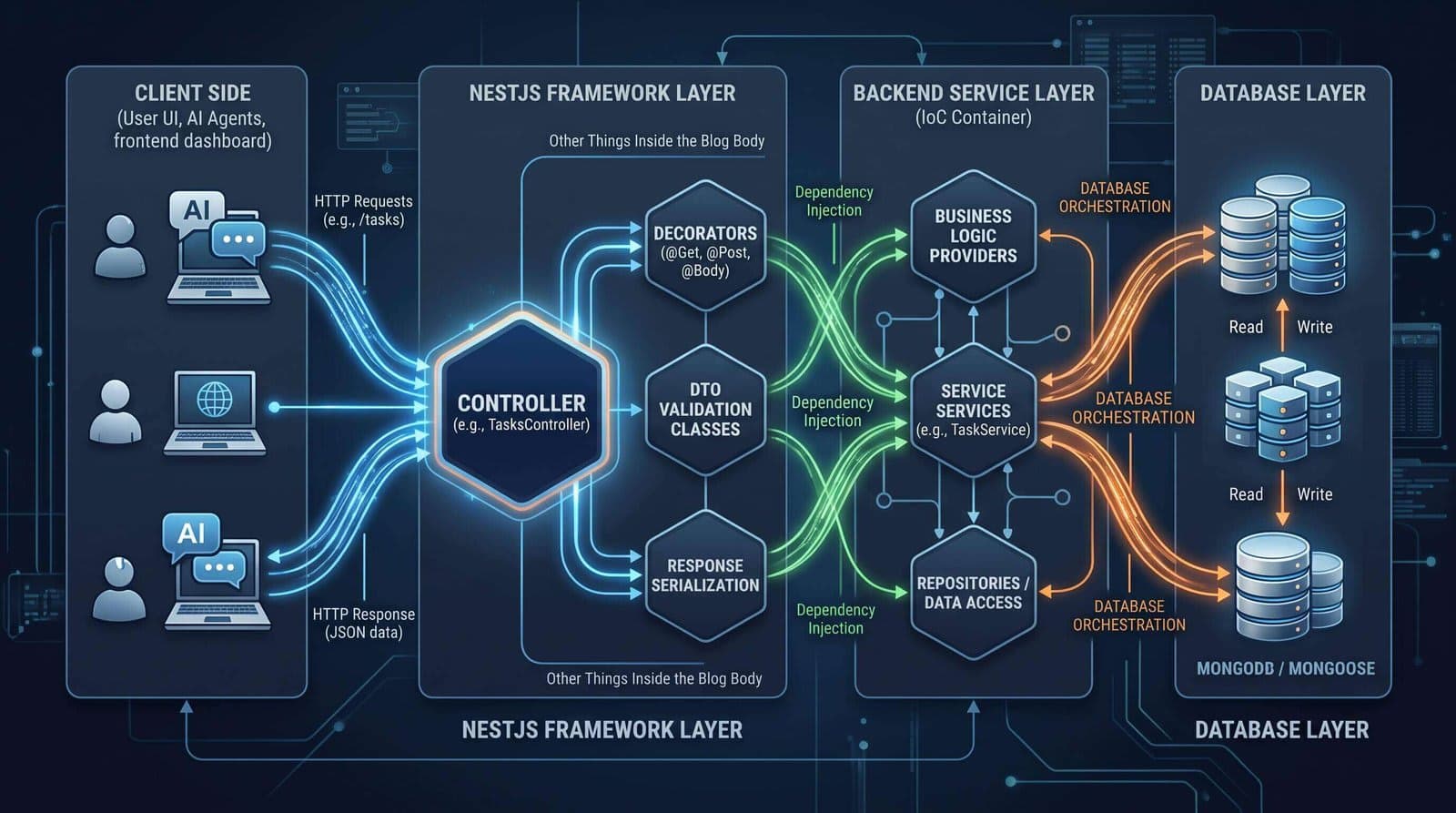
In enterprise software engineering, the entry point of your HTTP backend defines how cleanly client interaction layers scale. Without strong boundaries, controller methods quickly turn into cluttered dumps of database calls, request mutations, and unhandled side effects.
In this blog, I take a deep dive into NestJS Controllers by engineering the task management API channel for CodeOps AI—our AI Software Engineering Workspace. I will explore routing mechanisms, request payload extraction, DTO contract schemas, and parameter binding using Yarn as a standard toolchain.
Design Structured Route Handlers: Declare clean REST routing layers using @Controller() prefixes and HTTP verb decorators.
Bind Request Payloads Safely: Utilize parameter decorators like @Body(), @Query(), and @Param() instead of mutating raw platform objects.
Enforce Data Contracts via DTO Classes: Build compile-time and runtime-validated DTOs using ES6 classes rather than TypeScript interfaces.
Evaluate Response Serialization Strategies: Master standard automatic JSON serialization vs. library-specific response modes (@Res()).
Controllers are responsible for receiving incoming client requests and returning formatted responses. NestJS uses metadata decorators to link decorated TypeScript classes directly to the underlying HTTP routing tree.
Generate a clean controller scaffold using the Nest CLI and Yarn:
# Generate tasks controller using Nest CLI with Yarn
yarn nest g controller tasksThe @Controller('tasks') decorator sets a base URI route prefix. Combined with verb decorators like @Get(), @Post(), @Put(), and @Delete(), Nest maps HTTP requests directly to dedicated class methods.
Rather than inspecting raw Request objects, Nest provides granular parameter decorators out of the box:
NestJS Decorator | Underlying Express/Fastify Equivalent | CodeOps AI Use Case |
@Body(key?: string) | req.body / req.body[key] | Extracting task creation payload (title, prompt, priority). |
@Query(key?: string) | req.query / req.query[key] | Filtering tasks by status or pagination (limit, page). |
@Param(key?: string) | req.params / req.params[key] | Extracting dynamic task UUID route parameters. |
@Headers(name?: string) | req.headers / req.headers[name] | Extracting tenant API keys or client authorization tokens. |
@Req() / @Request() | req | Accessing raw platform request object (used sparingly). |
@Res() / @Response() | res | Direct response control (disables auto-serialization unless passthrough). |
When defining payload schemas, always use ES6 classes instead of TypeScript interfaces. Because TypeScript interfaces are stripped during transpilation, NestJS runtime features (such as ValidationPipes and Swagger metadata generation) require true JavaScript classes that persist at runtime.
// create-task.dto.ts
export class CreateTaskDto {
  title: string;
  prompt: string;
  priority: 'low' | 'medium' | 'high';
}
Architectural Trade-Off: Standard Mode vs. Library-Specific (@Res)
NestJS automatically serializes returned JavaScript objects to JSON with proper 200/201 status codes. Injecting @Res() switches the handler into library-specific mode, making you manually responsible for res.send(). Avoid @Res() unless strictly necessary (e.g. streaming or setting cookies), or enable { passthrough: true }.
Here is the completed CRUD controller demonstrating full parameter binding, route parameters, and query extraction for CodeOps AI:
import { Controller, Get, Post, Put, Delete, Body, Param, Query, HttpCode, HttpStatus } from '@nestjs/common';
import { CreateTaskDto, UpdateTaskDto, FilterTaskDto } from './dto';

@Controller('tasks')
export class TasksController {
  @Post()
  @HttpCode(HttpStatus.CREATED)
  create(@Body() createTaskDto: CreateTaskDto) {
    return {
      message: 'Task successfully queued for CodeOps AI processing',
      data: createTaskDto,
    };
  }

  @Get()
  findAll(@Query() query: FilterTaskDto) {
    return {
      status: 'success',
      limit: query.limit ?? 10,
      page: query.page ?? 1,
      items: [],
    };
  }

  @Get(':id')
  findOne(@Param('id') id: string) {
    return { id, title: `AI Task #${id}`, status: 'in_progress' };
  }

  @Put(':id')
  update(@Param('id') id: string, @Body() updateTaskDto: UpdateTaskDto) {
    return { id, updated: true, changes: updateTaskDto };
  }

  @Delete(':id')
  @HttpCode(HttpStatus.NO_CONTENT)
  remove(@Param('id') id: string) {
    return;
  }
}Maintain controller quality and continuous integration using standardized Yarn commands:
# Run dev server with hot reload
yarn start:dev

# Lint controller syntax and auto-fix formatting
yarn lint

# Execute controller unit tests
yarn testLeaking Business Logic into Controllers: Controllers should only handle transport protocols and payload extraction. Always delegate domain execution to provider services.
Disabling Auto-Serialization Unintentionally: Injecting @Res() without passthrough disables Nest's automatic status codes and JSON formatting, risking hung HTTP requests.
NestJS Controllers provide a clean, highly structured entry point for API request channels. By decoupling request handling from business logic and using class-based DTOs, backends remain scalable and fully testable.
Next blog: Providers, Services & Dependency Injection. We will build out service layers to encapsulate core domain logic and leverage NestJS Inversion of Control (IoC) containers.
I’d love to hear your thoughts on this architecture! How are you handling this in your own project? Share your feedback, questions, or experiences in the comment section below.
Comments