NestJS Exception Filters: Building Standardized, Resilient Error Handling Pipelines


Mr. Roy
Published about 15 hours ago
Discover curated collections of blog posts
Mr. Roy
Published about 15 hours ago
Strategic Writer
A technology and business leader with a strong focus on digital transformation, software delivery, and strategic growth. Experienced in leading JavaScript-focused teams, driving business development initiatives, and building innovative SaaS products. Passionate about AI-powered solutions, product development, stakeholder management, and creating scalable digital platforms. Skilled at bridging the gap between business objectives and technology execution while fostering collaboration across clients, teams, and partners.
Get personalized recommendations based on your reading history and interests. Visit the member dashboard to see blogs tailored just for you.
In production microservices, unhandled exceptions and inconsistent error payloads are silent killers of client integration quality. When services fail silently or crash with raw 500 stack traces, frontend teams waste hours guessing error causes, while API consumers encounter fragile user experiences. A truly enterprise-grade backend must treat failure modes as first-class citizens.
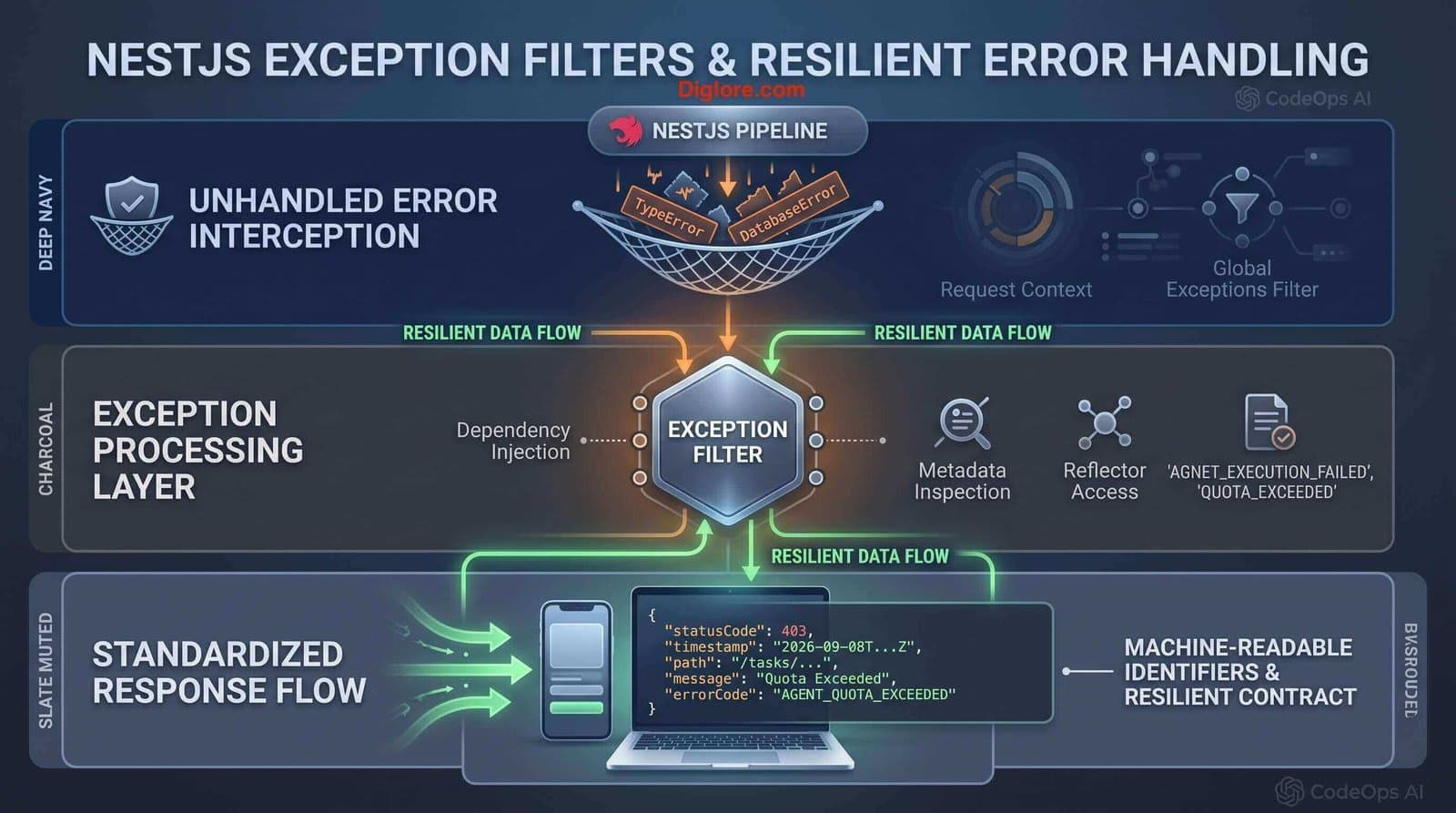
In this guide, I dive deep into NestJS Exception Filters—the built-in resilience layer responsible for intercepting and formatting all unhandled application errors. I will demonstrate how I leverage built-in HTTP exceptions, implement machine-readable error codes, construct custom platform-agnostic catch-everything filters, and register global filters via dependency injection for CodeOps AI (my AI Software Engineering Workspace project) using Yarn as the standard package manager.
Leverage Built-In HTTP Exceptions: Utilize standard exceptions (NotFoundException, ForbiddenException, BadRequestException) with custom causes and descriptions.
Implement Machine-Readable Error Codes: Attach stable, client-friendly error codes (errorCode) to response payloads to simplify client-side branching.
Construct Custom & Catch-Everything Filters: Build custom exception filters implementing ExceptionFilter and HttpAdapterHost for Express and Fastify compatibility.
Register Global Dependency-Injected Filters: Bind exception filters globally using the APP_FILTER token inside application modules using Yarn workflows.
NestJS features an out-of-the-box exceptions layer that catches unhandled errors across the application lifecycle. By default, any unhandled exception inheriting from HttpException produces a structured JSON response with a status code and short error description.
Exception Category | Handling Mechanism | CodeOps AI Architectural Role |
Built-in HttpExceptions | Caught automatically by standard global filter. | Standard REST errors (e.g., 400 Bad Request, 401 Unauthorized, 403 Forbidden). |
Custom Domain Exceptions | Inherit from base HttpException class. | Domain-specific failures (e.g., TaskQuotaExceededException, AgentExecutionException). |
Unrecognized Exceptions | Default to 500 Internal Server Error or caught by @Catch(). | System crashes, database connection drops, unhandled runtime TypeErrors. |
The base HttpException constructor accepts response messages, status codes, and an optional options parameter for internal error causes. Internal causes are preserved for server-side logging without leaking sensitive internals to the client:
// Throwing standard HTTP exceptions with cause
import { Controller, Get, HttpStatus, HttpException, BadRequestException } from '@nestjs/common';

@Controller('tasks')
export class TasksController {
  @Get(':id')
  async findOne() {
    try {
      // Core execution logic
    } catch (error) {
      throw new HttpException(
        {
          status: HttpStatus.FORBIDDEN,
          error: 'Access denied to target AI agent workspace',
        },
        HttpStatus.FORBIDDEN,
        { cause: error } // Preserved for server-side logging
      );
    }
  }
}HTTP status codes like 400 Bad Request are often too generic for client interfaces. To prevent clients from parsing human-readable strings, I attach a stable, machine-readable errorCode parameter:
// Attaching machine-readable error codes
throw new BadRequestException('Workspace agent quota exceeded', {
  errorCode: 'AGENT_QUOTA_EXCEEDED',
  description: 'Upgrade workspace tier to provision additional agents',
});
This generates a clean, predictable response payload for client consumers:
{
  "statusCode": 400,
  "message": "Workspace agent quota exceeded",
  "error": "Upgrade workspace tier to provision additional agents",
  "errorCode": "AGENT_QUOTA_EXCEEDED"
}To enforce domain-specific error handling across CodeOps AI, I create dedicated custom exception classes that extend HttpException:
// common/exceptions/agent-execution.exception.ts
import { HttpException, HttpStatus } from '@nestjs/common';

export class AgentExecutionException extends HttpException {
  constructor(agentId: string) {
    super(
      {
        message: `Execution failed for agent [${agentId}]`,
        errorCode: 'AGENT_EXECUTION_FAILED',
      },
      HttpStatus.INTERNAL_SERVER_ERROR
    );
  }
}To take total control over response formatting and handle all unhandled runtime errors regardless of underlying platform (Express or Fastify), I implement a catch-everything filter using HttpAdapterHost:
// common/filters/catch-everything.filter.ts
import { ExceptionFilter, Catch, ArgumentsHost, HttpException, HttpStatus } from '@nestjs/common';
import { HttpAdapterHost } from '@nestjs/core';

@Catch()
export class CatchEverythingFilter implements ExceptionFilter {
  constructor(private readonly httpAdapterHost: HttpAdapterHost) {}

  catch(exception: unknown, host: ArgumentsHost): void {
    const { httpAdapter } = this.httpAdapterHost;
    const ctx = host.switchToHttp();

    const httpStatus =
      exception instanceof HttpException
        ? exception.getStatus()
        : HttpStatus.INTERNAL_SERVER_ERROR;

    const responseBody = {
      statusCode: httpStatus,
      timestamp: new Date().toISOString(),
      path: httpAdapter.getRequestUrl(ctx.getRequest()),
      message:
        exception instanceof HttpException
          ? exception.getResponse()
          : 'Internal server error occurred',
    };

    httpAdapter.reply(ctx.getResponse(), responseBody, httpStatus);
  }
}Registering global filters inside main.ts using app.useGlobalFilters() prevents dependency injection. To inject services like Logger inside my exception filter, I bind it as a global provider using APP_FILTER in AppModule:
// app.module.ts
import { Module } from '@nestjs/common';
import { APP_FILTER } from '@nestjs/core';
import { CatchEverythingFilter } from './common/filters/catch-everything.filter';

@Module({
  providers: [
    {
      provide: APP_FILTER,
      useClass: CatchEverythingFilter,
    },
  ],
})
export class AppModule {}
Middleware Exception Rule
Because middleware runs prior to route handler binding, only global exception filters (registered via APP_FILTER or app.useGlobalFilters()) capture exceptions thrown from middleware. Controller-scoped @UseFilters() decorators will not trigger for middleware errors.
To test error handling pipelines and verify exception serialization under failure modes, I execute these Yarn commands:
# Launch dev server with hot reload
yarn start:dev

# Validate type checks and filter implementations via ESLint
yarn lint

# Execute integration tests for exception responses
yarn test:e2eLeaking Internal Stack Traces in Production: Returning raw error stack traces to clients in production exposes internal system details and security risks.
Instantiating Global Filters Outside Module DI Context: Using app.useGlobalFilters(new CustomFilter()) prevents the filter from injecting required providers like ConfigService or LoggerService.
Relying Strictly on Human-Readable Messages: Failing to attach machine-readable error codes forces client applications to perform fragile string matching.
Join the Discussion & Share Your Feedback
I’d love to hear your thoughts on this architecture! How are you handling this in your own project? Drop your feedback, questions, or experiences in the comment section below.
NestJS Exception Filters provide a centralized, resilient mechanism to govern application error responses. By leveraging machine-readable error codes, building platform-agnostic filters with HttpAdapterHost, and binding filters globally via dependency injection, I ensure CodeOps AI remains reliable and developer-friendly under failure conditions.
Comments