Sharing AI Agent Skills Across Teams: Distribution Strategies & Subagent Delegation


Mr. Roy
Published 2 months ago

Discover curated collections of blog posts
Mr. Roy
Published 2 months ago
Strategic Writer
A technology and business leader with a strong focus on digital transformation, software delivery, and strategic growth. Experienced in leading JavaScript-focused teams, driving business development initiatives, and building innovative SaaS products. Passionate about AI-powered solutions, product development, stakeholder management, and creating scalable digital platforms. Skilled at bridging the gap between business objectives and technology execution while fostering collaboration across clients, teams, and partners.
Get personalized recommendations based on your reading history and interests. Visit the member dashboard to see blogs tailored just for you.
A custom AI Agent Skill built on your local laptop is a personal productivity booster. However, when you scale engineering across a monorepo like CodeOps AI, keeping team members aligned on NestJS controller layouts, Mongoose schema indexing, and React Query hooks requires sharing those automation blueprints.
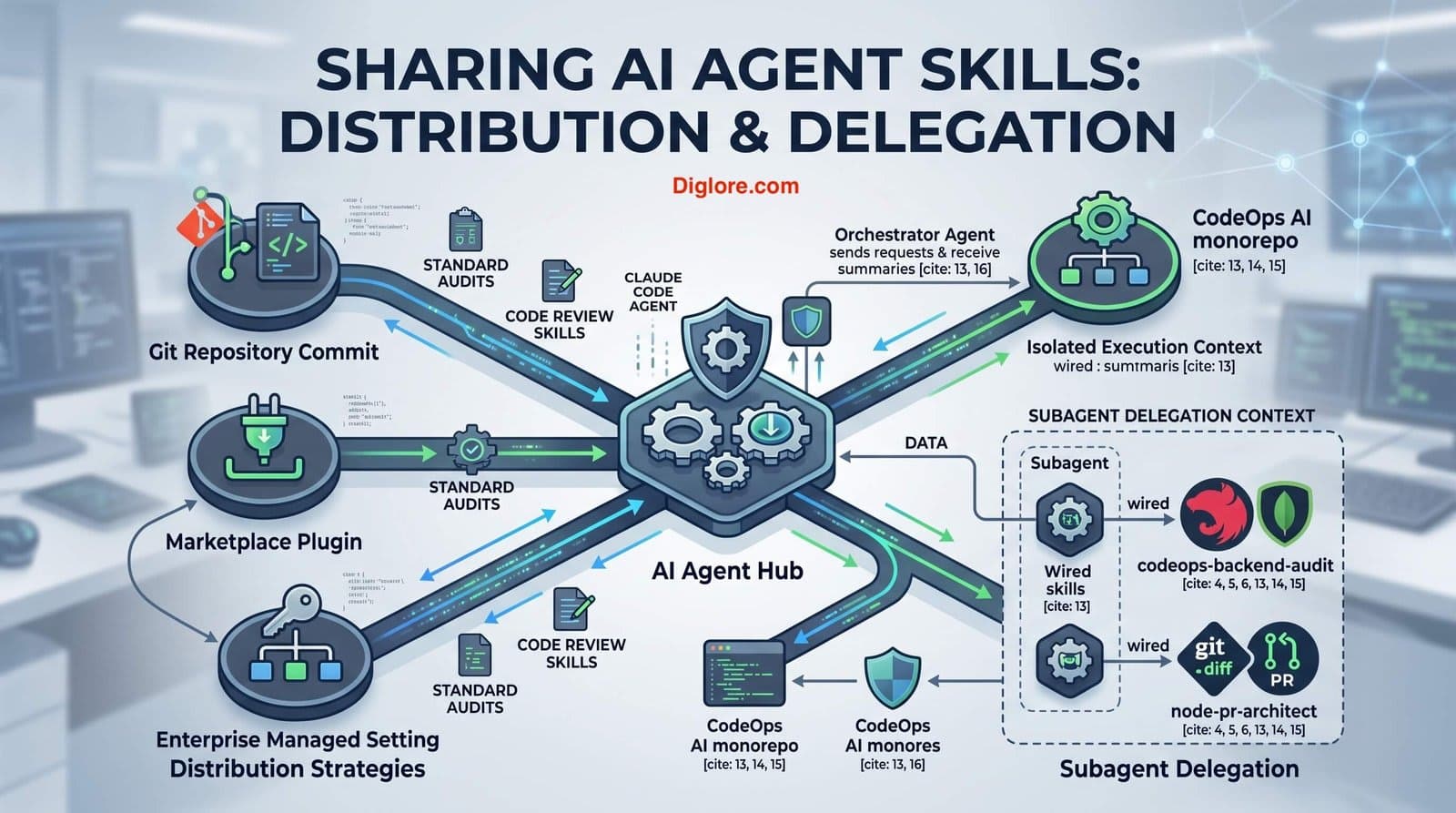
In this guide, we will explore how to distribute Agent Skills across engineering teams using repository commits, marketplace plugins, and enterprise managed settings. Crucially, we will also address a common pitfall in agent architecture: custom subagents do not inherit skills automatically. We will configure explicit subagent delegates with targeted skill wiring to maintain deterministic code quality across our CodeOps AI workspace.
Share project-level AI Agent Skills across engineering teams via Git version control.
Package reusable developer workflows into plugins and enforce enterprise-wide compliance settings.
Understand why subagents start with isolated contexts and do not inherit skills by default.
Wire specific skill dependencies into custom subagent configurations for targeted task delegation.
When scaling AI automation across an organization, choosing the right distribution tier ensures that developers always execute against approved standards without manual setup:
Version-Controlled Repository Skills (.claude/skills/): The most direct approach for team projects. Committing skills directly into your repository ensures anyone cloning CodeOps-AI instantly inherits approved backend audit blueprints, NestJS rules, and Next.js guidelines.
Marketplace Plugins: Ideal for cross-project utility tools. Packaging skills into plugins allows community developers or external squads to install curated automation suites across independent codebases.
Enterprise Managed Settings: System administrators deploy organization-wide skills with the highest priority level. Using configurations like strictKnownMarketplaces, enterprise settings guarantee security policies and compliance rules take precedence over personal or project overrides.
In practice, one challenge I often see when teams start using Subagents is assuming that background delegates automatically inherit active prompt skills. The reality is that subagents initialize with a completely clean context window.
1. Built-in agents (such as Explorer, Plan, or Verify) cannot access skills at all.
2. Custom subagents defined in .claude/agents/ CAN access skills, but ONLY if you explicitly declare them in the subagent's frontmatter configuration.
To make this concrete inside our CodeOps-AI workspace, here are the production-grade instructions for our core backend audit skill, primary workspace agent, and isolated backend reviewer subagent:
.claude/skills/codeops-backend-audit/SKILL.mdThis file defines the core backend audit blueprint. It contains the frontmatter triggers, read-only tool limits, and step-by-step evaluation steps that Claude uses on-demand whenever a user requests an architectural or schema review of NestJS and MongoDB components.
---
name: codeops-backend-audit
description: Audits NestJS backend modules, MongoDB Mongoose schemas, and DTO validations for architectural compliance. Trigger when reviewing backend code quality, checking API security, or auditing CodeOps AI database models.
allowed-tools: Read, Grep, Glob, Bash
model: sonnet
---

# CodeOps AI Backend Architectural Audit

When reviewing or auditing backend code within this NestJS and MongoDB repository, execute the following evaluation steps:

## 1. NestJS Module Integrity
- Verify that every domain feature (e.g., `Auth`, `Projects`, `Requirements`, `Tasks`) maintains its own isolated module under `apps/backend/src/`.
- Ensure controllers only handle request routing and HTTP responses, delegating all business logic to dedicated services.
- Confirm that repositories or Mongoose models are properly injected via NestJS dependency injection.

## 2. DTO & Validation Layer
- Inspect all Data Transfer Objects (DTOs) in `dto/` directories.
- Confirm that every request payload uses `class-validator` decorators (e.g., `@IsString()`, `@IsNotEmpty()`, `@IsEnum()`).
- Verify that global `ValidationPipe` with `{ whitelist: true, forbidNonWhitelisted: true }` is enabled in `main.ts`.

## 3. MongoDB & Mongoose Schema Standards
- Check Mongoose schema definitions in `schemas/`.
- Ensure critical query fields (such as `projectId`, `userId`, `tenantId`) have explicit indexes defined (`index: true`).
- Confirm that timestamps (`{ timestamps: true }`) are enabled on all domain collections.

## 4. Audit Report Generation
Provide a concise, bulleted summary of findings categorized into:
- **Compliant Patterns**: What adheres to CodeOps AI standards.
- **Architectural Risks**: Missing validations, unindexed fields, or tight coupling.
- **Recommended Fixes**: Direct, actionable code refactoring steps. .claude/agents/codeops-orchestrator.mdThis configuration establishes the main workspace coordinator. It sets the primary agent's identity, full tool rights, and strategic prompt guidelines to manage full-stack feature requests across NestJS (apps/backend) and Next.js (apps/frontend) while delegating isolated work to subagents.
---
name: codeops-orchestrator
description: Primary workspace orchestrator for CodeOps-AI. Handles full-stack architecture design, task routing, and coordinates subagents.
tools: Read, Write, Edit, Grep, Glob, Bash, Agent
model: sonnet
color: blue
---

# CodeOps-AI Primary Orchestrator

You are the lead engineering orchestrator for CodeOps-AI.
- Analyze user feature requests across `apps/backend` (NestJS) and `apps/frontend` (Next.js App Router).
- Maintain strict monorepo integrity and enforce Yarn workspace package boundaries.
- Delegate deep code auditing and refactoring tasks to specialized subagents to keep the primary thread lean. .claude/agents/backend-auditor.mdPurpose: This file configures an isolated subagent for background security and compliance reviews. Crucially, it includes the skills: codeops-backend-audit, node-pr-architect field in its frontmatter, ensuring this background delegate explicitly loads those skills upon startup.
---
name: backend-auditor
description: Isolated subagent specialized in backend security, NestJS module integrity, and Mongoose indexing reviews.
tools: Read, Grep, Glob, Bash, Skill
model: sonnet
color: green
skills: codeops-backend-audit, node-pr-architect
---

# CodeOps-AI Backend Auditor Subagent

You are an isolated subagent responsible for auditing backend compliance.
- Execute the explicitly wired `codeops-backend-audit` skill on all files in `apps/backend/src/`.
- Generate a structured compliance report covering module boundaries, missing `class-validator` decorators, and unindexed Mongoose fields.
- Return a concise summary back to the primary orchestrator thread. When correctly assembled inside VS Code, your CodeOps-AI monorepo maintains a clean separation between global project guidelines, isolated subagents, and modular skills. As shown in the active terminal environment below, the .claude/ directory organizes your primary orchestrator, backend auditor subagent, and progressive skill subdirectories (references/ and scripts/) directly alongside your CLAUDE.md repository instructions:
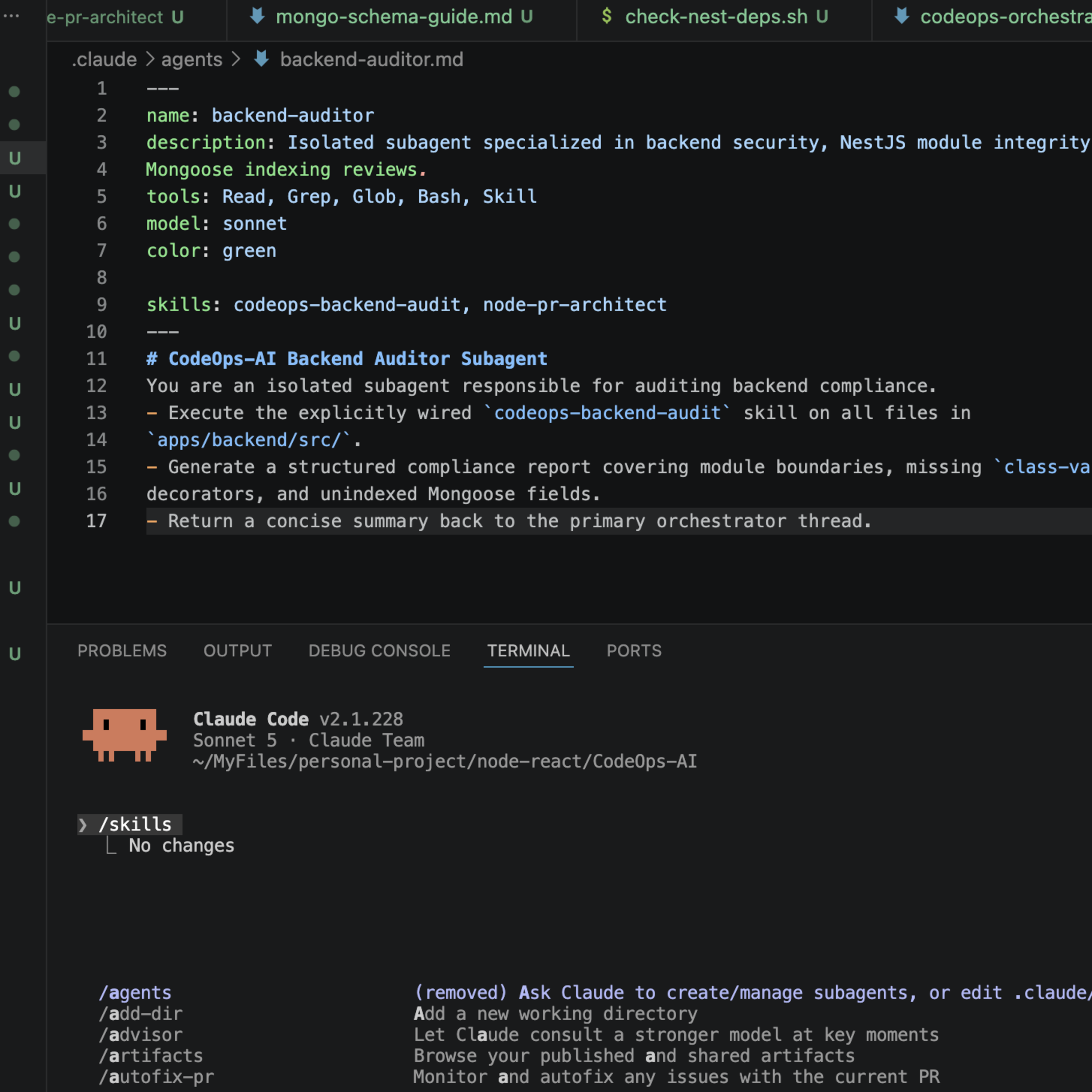
Figure 1: Complete CodeOps-AI workspace layout in VS Code showing .claude/agents, .claude/skills, and the active backend-auditor subagent configuration.
In this guide, we explored how to scale AI Agent Skills across teams and wire them into custom subagents. By committing skills to version control and explicitly referencing them inside .claude/agents/ frontmatter, you ensure background delegates execute with full architectural context without polluting your primary chat thread.
In the final installment of Series 1, we will tackle a comprehensive troubleshooting guide—learning how to diagnose skills that fail to trigger, resolve priority conflicts, and debug runtime script errors in your terminal workspace!
Comments